PFTrack Hardware Guide

Updated: Jul 23

Professional camera tracking and photogrammetry on hardware that works for you
Recommended configurations for macOS, Windows, and Linux
The Pixel Farm Ltd — 2026
Hardware Guide Table of Contents
Introduction
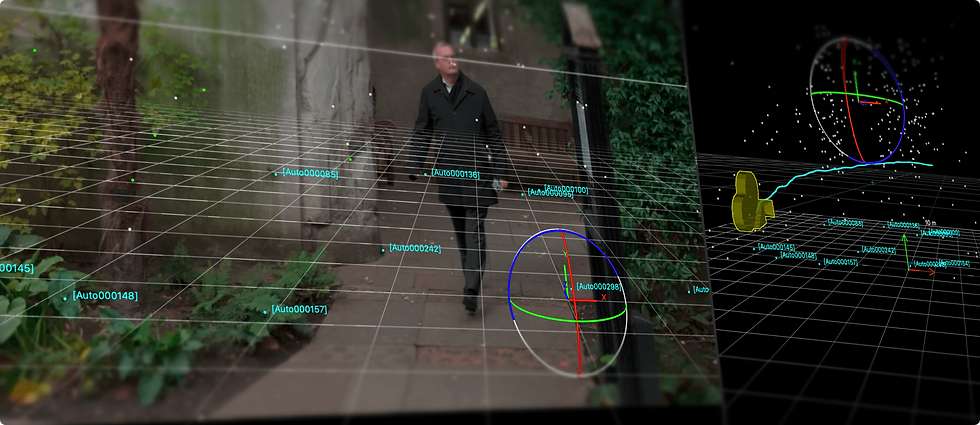
PFTrack is a production-grade spatial intelligence platform used by VFX studios, forensic science organisations, virtual production facilities, and architectural visualisation teams worldwide. For over two decades it has powered Oscar-winning feature films, high-end episodic television, and forensic investigations demanding absolute precision.
Unlike many professional creative tools, PFTrack does not demand exotic hardware. It runs natively on macOS (including Apple Silicon), Windows, and Linux, and is designed to deliver professional results on a wide range of configurations, from a solo artist’s laptop to a multi-seat studio deployment.
However, PFTrack’s workload is distinctive. Understanding what drives performance in camera tracking, photogrammetry, and scene reconstruction will help you choose hardware that maximises your productivity and avoids wasting budget on components that don’t matter. The key factors are:
Single-core CPU speed for tracking solves. Camera and object tracking in PFTrack is fundamentally a mathematical optimisation problem. The solver iterates through tracked features, refining camera parameters until the solution converges. This work is heavily dependent on single-core CPU performance. A CPU with fast individual cores will solve faster and keep the interface responsive during interactive work. Core count matters less than per-core speed for day-to-day tracking.
Multi-core throughput for photogrammetry and batch processing. Photogrammetry — reconstructing 3D geometry from multiple images, involves ML-accelerated feature matching, bundle adjustment, and mesh generation across hundreds or thousands of images. These operations benefit from multiple CPU cores working in parallel. Similarly, batch processing multiple shots benefits from core count. For studios running heavy photogrammetry workloads, a CPU that balances strong single-core and high multi-core performance is ideal.
GPU acceleration for ML features and display. PFTrack uses GPU acceleration via OpenCL for ML-accelerated feature matching, point cloud visualisation, and real-time viewport display of complex scenes with millions of tracking points. A modern mid-range GPU is sufficient for most workflows. PFTrack supports both NVIDIA and AMD GPUs on Windows and Linux, and uses the integrated GPU on Apple Silicon Macs — which delivers excellent performance thanks to the unified memory architecture.
Memory for large image sets and point clouds. Tracking a single shot requires modest memory. But photogrammetry from hundreds of high-resolution images, or working with dense LiDAR point clouds, can consume significant RAM. 16 GB is the practical minimum for professional use; 32 GB or more is recommended for photogrammetry and large-scale scene reconstruction.
This PFTrack hardware guide covers recommended configurations for all three supported platforms, storage strategy, and deployment guidance for multi-seat facilities.
PFTrack runs on hardware you already own. An M4 MacBook Pro, a mid-range Windows workstation, or a Linux box with any modern GPU can deliver production-quality camera solves and photogrammetry. This guide will help you choose the right configuration for your workflow.
macOS: Native Apple Silicon Performance
PFTrack runs natively on Apple Silicon and takes full advantage of the unified memory architecture of M-series chips. The CPU, GPU, and Neural Engine share the same high-bandwidth memory pool, which is particularly beneficial for photogrammetry workflows where large image datasets and point clouds are accessed by both CPU and GPU operations without data transfer bottlenecks.
For the majority of individual PFTrack users, a Mac with Apple Silicon is an excellent choice. It delivers strong single-core performance for tracking solves, efficient GPU acceleration for ML features and viewport display, and low power consumption in a quiet, compact form factor.

The M5 Pro and M5 Max MacBook Pro (March 2026)
The latest MacBook Pro models, launched in March 2026, introduce the M5 Pro and M5 Max chips built on Apple’s new Fusion Architecture. This is a significant upgrade for PFTrack users:
Up to 30% faster CPU performance over the M4 Pro generation — directly translating to faster camera solves and more responsive interactive tracking. PFTrack’s solver is heavily single-core dependent, and the M5 Pro’s faster cores mean noticeably quicker convergence on complex shots.
Up to 50% faster GPU performance with Neural Accelerators in every GPU core. PFTrack’s ML-accelerated feature matching in the Photo Survey node and real-time viewport display of dense point clouds both benefit directly from the GPU uplift.
Up to 2x faster SSD speeds improve footage loading, image set access during photogrammetry, and point cloud streaming. Combined with 1 TB standard storage on M5 Pro models (2 TB on M5 Max), the new MacBook Pros have more room for project footage out of the box.
Higher unified memory bandwidth benefits workflows where large datasets are shared between CPU and GPU — precisely the case when PFTrack is running ML feature matching on hundreds of high-resolution photogrammetry images while simultaneously displaying a dense 3D point cloud in the viewport.
Recommended Configurations
Solo Artist / Freelancer | Studio Artist / Regular Production | Heavy Photogrammetry / Large Scenes | |
Best Mac | MacBook Pro 14" (M5) or Mac Mini (M4 Pro) | MacBook Pro 14"/16" (M5 Pro) or Mac Mini Pro (M4 Pro) | MacBook Pro 16" (M5 Max) or Mac Studio (M4 Max / M3 Ultra) |
Chip | M5 / M4 Pro | M5 Pro (15–18 core CPU, 16–20 core GPU) | M5 Max (18 core CPU, 32–40 core GPU) / M3 Ultra |
Unified Memory | 16–24 GB | 24–48 GB | 36–128 GB (M5 Max) / 96–512 GB (M3 Ultra) |
Storage | 1 TB (standard on M5 MacBook Pro) | 1–2 TB (M5 Pro starts at 1 TB) | 2–8 TB (M5 Max starts at 2 TB) |
Best For | Solo matchmoving, moderate tracking workloads, on-location use | Daily production tracking, photogrammetry from tens of images, studio workflows | Large-scale photogrammetry (hundreds of images), dense LiDAR, 8K footage, batch processing |
Approx. UK Price | From ~£1,599 (Mac Mini M4 Pro) / ~£1,699 (MacBook Pro 14" M5) | From ~£2,199 (MacBook Pro 14" M5 Pro) / ~£2,499 (16" M5 Pro) | From ~£3,599 (MacBook Pro 14" M5 Max) / ~£2,099 (Mac Studio M4 Max) |
Our advice: For most matchmoving and tracking work, the MacBook Pro with M5 Pro and 24 GB of unified memory is now the sweet spot. Its 30% CPU uplift over the M4 Pro translates directly to faster solver convergence, and the 1 TB standard storage means you have room for active project footage without immediately needing external drives. For heavy photogrammetry, the M5 Max with 48 GB or more provides the GPU cores and memory bandwidth to handle large image sets efficiently. The Mac Mini with M4 Pro remains an excellent desktop option if you don’t need portability, and the Mac Studio with M4 Max or M3 Ultra is the top choice for the most demanding 8K and large-scale scene reconstruction work.
Portability note: PFTrack is one of the few professional tracking tools that runs natively on Apple Silicon laptops. The MacBook Pro 14" with M5 Pro is a uniquely capable portable tracking workstation, ideal for VFX supervisors doing on-set tracking verification, client presentations, or field photogrammetry work. The M5 Pro’s Thunderbolt 5 and Wi-Fi 7 connectivity also make it well-suited for fast data transfer on location.

Windows: Flexibility and GPU Choice
PFTrack runs on Windows with GPU acceleration via OpenCL, supporting both NVIDIA and AMD GPUs. Windows gives you the widest hardware choice and the ability to configure a workstation specifically tuned to your workload, whether that’s pure matchmoving, heavy photogrammetry, or a mixed VFX pipeline where PFTrack sits alongside Maya, Nuke, and other DCC tools.
CPU: Single-Core Speed Matters Most
For camera tracking and solving, PFTrack benefits most from fast single-core CPU performance. The solver’s iterative optimisation runs primarily on a single thread, so a CPU with high clock speed and strong IPC (instructions per cycle) will deliver faster solves and a more responsive interface.
For photogrammetry and batch processing, additional cores become valuable. The ideal CPU for a mixed PFTrack workload balances both: high single-core turbo speed with a healthy core count for parallel operations.
Budget / Solo | Mid-Range / Studio | High-End / Photogrammetry | |
CPU | Intel Core i7-14700K or AMD Ryzen 7 7800X3D | Intel Core i9-14900K or AMD Ryzen 9 7950X | Intel Core i9-14900KS or AMD Ryzen 9 9950X |
RAM | 16–32 GB DDR5 | 32–64 GB DDR5 | 64–128 GB DDR5 |
GPU | NVIDIA RTX 4060 or AMD RX 7600 | NVIDIA RTX 4070 Super or AMD RX 7800 XT | NVIDIA RTX 4080 Super or AMD RX 7900 XTX |
Storage | 1 TB NVMe SSD | 2 TB NVMe SSD | 2–4 TB NVMe SSD + bulk storage |
Best For | Solo matchmoving, freelance tracking | Studio production, regular photogrammetry, mixed DCC pipeline | Large-scale photogrammetry, dense point clouds, 8K footage, batch processing |
Approx. Build Cost | ~£1,000–£1,500 | ~£1,800–£2,500 | ~£3,000–£4,500 |
GPU: Mid-Range Is Enough for Most Workflows
PFTrack uses OpenCL for GPU acceleration, which means it works with both NVIDIA and AMD GPUs. You do not need a top-tier graphics card for professional tracking work. The GPU is primarily used for ML-accelerated feature matching in the Photo Survey node, point cloud and mesh display in the viewport, and real-time preview of tracking results.

Our recommendation: An NVIDIA RTX 4070 Super or AMD RX 7800 XT hits the sweet spot for most PFTrack users. These mid-range cards provide ample compute for ML features and smooth viewport performance even with dense point clouds, at roughly £400–£550. You do not need to spend £1,000+ on a GPU for PFTrack unless you are running other GPU-intensive applications alongside it.
NVIDIA vs AMD: Both are fully supported. If you also run applications that require CUDA (such as certain Nuke plugins, Resolve GPU acceleration, or ML training tools), choose NVIDIA. If PFTrack is your primary GPU-accelerated application, choose whichever offers the best value at your budget.
Linux: The Pipeline and Facility Platform
PFTrack supports Rocky Linux 8 and 9 (RHEL compatible), making it deployable in professional VFX pipeline environments alongside other Linux-based DCC tools. Linux is typically the choice for facilities running multi-seat deployments, render farms with integrated tracking, and custom pipeline automation.
Hardware recommendations for Linux mirror the Windows guidance above — the same CPUs, GPUs, and memory configurations apply. The primary differences are operational:
✓ Rocky Linux 8 or 9 (RHEL 8/9 compatible) is the supported distribution. CentOS Stream 8/9 is also compatible.
✓ NVIDIA GPUs require the proprietary NVIDIA driver and OpenCL runtime. AMD GPUs require the ROCm or AMDGPU-PRO driver.
✓ PFTrack’s command-line interface (CLI) enables headless batch processing for pipeline automation, including tracking and photogrammetry jobs dispatched from production management tools.
✓ Python scripting APIs allow deep integration with studio pipelines, including automated shot setup, solve parameter configuration, and export to downstream tools.
✓ PFTrack Enterprise supports deployment in virtual machine (VM) and containerised environments for cloud or virtualised studio infrastructure.
Enterprise deployment note: For multi-seat studio deployments on Linux, PFTrack Enterprise with PFBucket licence server is recommended. PFBucket manages floating licence distribution across your network, supports air-gapped environments, and provides centralised entitlement administration. Contact The Pixel Farm for enterprise configuration guidance.
Storage Strategy for PFTrack
PFTrack’s storage requirements differ depending on the workflow. Camera tracking of a single shot involves relatively modest I/O, reading a sequence of frames and writing tracking data. Photogrammetry, however, can involve hundreds or thousands of high-resolution images, generating dense point clouds and large mesh files. The right storage strategy ensures fast interactive performance across both workflows.

What Drives Storage Performance in PFTrack
Footage loading: When you load a clip into PFTrack, frames are read sequentially from disk. NVMe SSD speeds (3,000–7,000+ MB/s) mean footage loads almost instantly and scrubbing through the timeline is fluid. On a spinning hard drive or slow external storage, loading a 4K DPX sequence can become a bottleneck that interrupts your tracking workflow.
Photogrammetry image sets: The Photo Survey node reads potentially hundreds of high-resolution images during feature matching and reconstruction. Fast random-access reads from an NVMe SSD dramatically reduce the time PFTrack spends loading images, particularly during the iterative refinement stages where the same images are accessed multiple times.
Point cloud and mesh data: Dense point clouds from photogrammetry or LiDAR can be several gigabytes. Loading and saving this data benefits from fast sequential I/O. The viewport also streams point cloud data from disk when the dataset exceeds available RAM, so NVMe speeds directly affect interactive responsiveness.
Project files and exports: PFTrack project files are relatively small (kilobytes to megabytes), as they store node graph configuration, tracking parameters, and solve results — not the source footage itself. Saving and loading projects is effectively instantaneous on any modern SSD. Export operations (writing camera data, meshes, and USD/FBX/Alembic files) are also lightweight.

Recommended Storage Configurations
Workflow | Primary Drive (NVMe) | Bulk / Archive Storage | Approx. Cost |
Matchmoving only, HD/2K footage | 512 GB–1 TB NVMe SSD | External USB-C drive for archived projects | ~£60–£120 |
Regular tracking + moderate photogrammetry | 1–2 TB NVMe SSD | 4–8 TB external SSD or NAS | ~£150–£400 |
Heavy photogrammetry, 4K/8K footage, LiDAR | 2–4 TB NVMe SSD | NAS over 10GbE or large external SSD array | ~£400–£1,000+ |
Practical tip: Keep your active project footage and image sets on the fast NVMe drive. Move completed projects to bulk storage (external drive or NAS) when done. PFTrack’s project files are tiny, so the NVMe capacity you need is determined by your source media, not by PFTrack itself.
Mac Mini Pro note: The M4 Pro Mac Mini includes an extremely fast internal NVMe SSD (6,000–7,000+ MB/s sequential reads) plus Thunderbolt 5 and USB-C for external storage. It’s an excellent PFTrack workstation with straightforward storage expansion.
PFTrack Editions and Licensing
PFTrack is available in three editions, each designed for a different scale of deployment. All three editions use the same core tracking engine and run on the same hardware, the differences are in licensing model, pipeline integration features, and support.
PFTrack Solo | PFTrack Studio | PFTrack Enterprise | |
Target User | Individual artists and freelancers | Teams and small studios | Large studios and organisations |
Toolset | Core 3D tracking and matchmoving | Full toolset including photogrammetry, image modelling, scene reconstruction | Everything in Studio + extended Python APIs, CLI, VM support |
Licence Type | Single-user, perpetual | Floating, perpetual or rent-to-buy | Floating network via PFBucket (rental or permanent + maintenance) |
Offline / Air-Gapped | No | No | Fully supported |
Pipeline Integration | Standard export formats | Python API, command-line operation | Extended Python APIs, macros, custom automation, VM support |
Support | Community + in-app AI assistant | Community + optional ticketed support | Dedicated liaison + enterprise SLAs |
Free Trial | Free trial — full toolset with exports enabled for a limited period | Limited trial mode — full toolset, exports disabled | Contact sales for evaluation |
Hardware choice is independent of edition. PFTrack Solo, Studio, and Enterprise all run the same tracking engine on the same hardware. Choose your edition based on licensing needs and pipeline requirements, not hardware. The configurations in this guide apply equally to all three.
Multi-Seat Studio Deployment
For studios deploying PFTrack across multiple seats, PFTrack Enterprise with PFBucket licence server provides the flexibility and administrative control required for professional production environments.
Reference Deployment: 4–8 Seat VFX Studio
A typical mid-size VFX studio running PFTrack for matchmoving and photogrammetry alongside other DCC tools:
✓ Workstations: 4–8 Linux or Windows workstations, each with a high-single-core CPU (Intel i9 or AMD Ryzen 9), 64 GB RAM, and an NVIDIA RTX 4070 Super or equivalent
✓ Shared storage: NAS (Synology, QNAP, or TrueNAS) over 10GbE, providing shared footage access and project file storage across all seats
✓ PFBucket licence server: Deployed on a lightweight server or VM on the same network, managing floating licences across all workstations. Operators can check out a licence when they need PFTrack and release it when moving to other work
✓ Batch processing: PFTrack’s CLI enables headless batch jobs — tracking solves and photogrammetry can be dispatched to idle workstations overnight or to a dedicated processing node
✓ Pipeline integration: Python APIs and CLI tools integrate PFTrack into shot management systems, enabling automated project setup, solve submission, and export to downstream tools
Network requirements: 10GbE is recommended for shared footage access. PFBucket licence traffic is minimal (a few kilobytes per licence check-out) and works over any network. For air-gapped environments, PFBucket operates entirely on the local network with no external connectivity required.

Scaling Up: Virtual Production and Forensic Facilities
For larger deployments serving virtual production stages, forensic analysis teams, or architectural visualisation departments, the same architecture scales. PFBucket supports multi-site licence distribution, allowing seats across different physical locations to share a common licence pool. Contact The Pixel Farm for guidance on enterprise deployments exceeding 8 seats.

PFTrack Support & Resources
PFTrack is backed by support and learning resources matched to your licence tier. All users have access to community and self-service resources; Studio and Enterprise customers receive additional direct support from The Pixel Farm.
All Users
✓ PFTrack User Group — community forum for peer support and interaction with The Pixel Farm’s product specialists (www.pftrack.com)
✓ Learning Articles — technical articles on sensor data, lens distortion, tracking techniques, and photogrammetry workflows (www.pftrack.com/learning-articles)
✓ Tutorials — step-by-step video tutorials for specific tracking and reconstruction tools (www.pftrack.com/pftrack-tutorials)
✓ Resources — export scripts, workflow guides, and pipeline integration documentation (www.pftrack.com/resources)
✓ In-app AI assistant — context-aware guidance available directly within PFTrack
✓ PFTrack Documentation — comprehensive product and licensing documentation (pftrack.thepixelfarm.co.uk/documentation)
Solo (Personal) Accounts
✓ Everything above, plus a perpetual licence with all software updates included for the life of the product — no ongoing subscription, no maintenance fees, no expiry
Studio Accounts
✓ Everything above, plus optional direct IM ticketed support for private contact with The Pixel Farm’s support team from within the application
✓ Software upgrades included for the life of the product under perpetual purchase. Rent-to-buy licences include upgrades for the duration of the rental period
Enterprise Accounts
✓ Dedicated technical liaison, a named contact who handles onboarding, PFBucket configuration, pipeline integration, and ongoing support
✓ Direct in-app IM support for all operators and licence administrators
✓ Technical support covering installation, PFBucket deployment, multi-site configuration, VM environments, and bug reporting
✓ Custom maintenance contracts with priority issue resolution and accelerated software updates
✓ Onboarding and integration assistance, pipeline setup, batch processing configuration, and integration with Maya, Nuke, Unreal Engine, and other DCC tools
For enterprise enquiries, including bespoke support packages, volume licensing, and deployment planning, contact The Pixel Farm directly at sales@thepixelfarm.co.uk or visit www.pftrack.com.
Quick-Start Recommendation
If you are setting up PFTrack for the first time and want a single best recommendation for each use case:
Solo matchmove artist:
MacBook Pro 14" with M5 Pro (24 GB, 1 TB SSD). From ~£2,199. A portable, silent, production-capable tracking workstation with 30% faster solves than the previous generation. Download PFTrack Solo’s free trial from www.pftrack.com and start tracking immediately — full export included.
Studio workstation:
Windows or Linux workstation with AMD Ryzen 9 7950X, 64 GB DDR5, NVIDIA RTX 4070 Super, and 2 TB NVMe SSD. Approximately £2,000–£2,500 built. Handles everything from daily matchmoving to regular photogrammetry.
Apple desktop:
Mac Mini Pro with M4 Pro (24 GB, 1 TB SSD). From approximately £1,799. Compact, quiet, and powerful enough for professional tracking and moderate photogrammetry. Pair with any colour-accurate monitor.

Try PFTrack Solo Free
Try PFTrack Solo free for 7 days, with full export functionality, enough time to take a real plate from track through Hero Cloud and into Postshot, USD, or your DCC of choice.

